
Trying to get sites to display identically across multiple browsers and multiple operating systems is awkward. This site probably doesn’t display particularly well on all browsers, but I’m not a professional web designer / developer, so you’ll have to excuse me. It’s also not a corporate / business website trying to sell products or services to the public.
Screenclick, however, is a business website.
Earlier this evening I decided to visit it on my Mac using Firefox. Apart from the really annoying splash page, which doesn’t do anything useful, the main page does not load correctly in Firefox 3 on the Mac: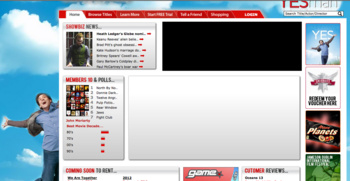
Now if you open the same page in Safari you seem something totally different: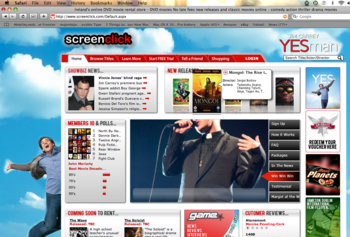 Why?
Why?
Seemingly somebody decided to use Microsoft’s Silverlight, but didn’t bother to do a simple plugin check that would either prompt the user to install the plugin or gracefully degrade.
I won’t be able to view their site on my Linux desktop either, as Silverlight isn’t available for Linux (there is a port, but last time I checked there wasn’t a native Debian / Ubuntu version available)
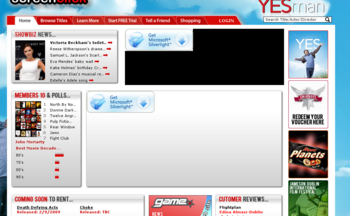
UPDATE: I’ve now moved to my Ubuntu Linux desktop and this is what I get:
The wonderfully helpful splash page (do they honestly expect me to continue browsing after seeing that?)

and the inner page (for some odd reason it’s actually telling me that I need Silverlight now, whereas it wasn’t on my Mac!)
![Reblog this post [with Zemanta]](http://img.zemanta.com/reblog_e.png?x-id=65321d5f-a4f4-4a8d-9660-a377ec709e81)






Should’ve used Flash. Who has the Silverlight plugin installed anyway? Not me.
Fair point Ken… but why bother with any animation anyway? Isn’t that overkill on a site of this nature?
The use of Flash is like casual sex, Hugh. If you do it responsibly then it’s usually okay.
Provided the Flash is intuitive, serves a purpose and, most importantly, degrades gracefully then there’s nothing wrong with it in my opinion. People need to stop asking ‘why?’ where the use of Flash is concerned and start asking ‘why not?’. If it’s unobtrusive and enhances the user experience and/or aesthetic, then that’s a good thing.
Developers should also recognize that browsers are, in general, designed to compete and so do not play fair. Try the Acid3 web test to see how bad it gets…
http://www.webstandards.org/action/acid3
Oh Ken, agree completely.
Used well it can be great, but on some sites for some purposes.
Ken
Flash wouldn’t cause issues for most browsers and I’d be able to access the site without feeling like a “2nd class citizen”.
Michele
Although i have nothing against Flash- I’d have preferred to have seen a jquery or prototype/scriptaculous solution. Probably would’ve been easier to develop, degraded better, faster to load etc etc.
It also would’ve worked on iphones and other devices where updates were limited (ok ok, probably just the iphone)
A silly decision. I just installed silverlight on my mac. Hopefully I won’t have to spend the afternoon removing it and restoring my system. Microsoft are like the software jinx of the mac.
Wait till you guys see Adobe push their AIR platform a little harder. They’ll need to do this before Silver(Moon)light get more traction though.
Like all of these ‘enabling’ technologies, nobody ever likes to change. All changes to familiar delivery platforms come with some level pain. However, the flash platform is limited in terms of being a development platform and the newer generation platforms are web 2 OH (whatever that is this week). FWIW Silver(moon)light is already featured on a number of very high profile sites and usage is growing.
I’ve gone and installed http://mono-project.com/Moonlight to deal with silverlight on sites on my laptop which runs Ubuntu, now I don’t have any issues. Just a suggestion. I’m sure maybe there are others out there.
From a testers point of view, it sucks donkey balls!
@ John,
Yup totally right. On their homepage (after you get past the splash page), they’re just using silverlight to put tooltips on some DVDs to pop up the title / rating etc, and below that some tabs based box which they could have easily knocked together using jquery.
I installed Silverlight for the craic, and accessed the site using the latest version of Internet Explorer – and I got a nice big old popup window with a windows style error. Nice one!
I wouldn’t say Flex was limited in terms of being a development platform, Stephen. Which is what Silverlight is essentially competing with.
To be honest, I don’t really see Flash going anywhere. It’s pretty much ubiquitous, whether people like it as a technology or not. Either way, the same irresponsible executions are no less likely to occur with Silverlight than they are with Flash/Flex. But I do think a compelling case will need to be made for people do even bother installing the Silverlight plug-in. It will require serious widespread adoption by developers if it’s ever going to find worthwhile penetration amongst the general population.
Does anyone know if the Silverlight plug-in comes installed by default with IE7 or IE8?
You’re right, it’s a truism that irresponsible development is bad regardless of the platform one uses, however, Silverlight development has been shown to be much simpler than Flex – I guess this could degenerate into a ‘My ZXspectrum is better than your C64’ 🙂
Silverlight is being delivered to the Microsoft Update Channel as we type, and I would suspect that you’ll see it in IE8 by default (IE8 has just hit its Release Candidate status)
Laura
I think you’re missing the point. They want to sell to me (you and everyone else) a service.
Why should a potential consumer be forced to jump through hoops to access the service?
It makes zero sense to me.
Also the stuff they’re doing with SilverLight could have been done using other technologies that are available cross-browser / cross-platform
Michele
I don’t think Laura is missing the point per se. If Silverlight ultimately improves the user experience the whoopee! everyone’s a winner.
You didn’t cite an issue with installing Flash or any other plugin thing. My point? Well, my point is that this issue isn’t a silverlight vs. flash thing (anymore) rather, it’s an issue of poor change management on the part of the service provider. That change has upset you, and that’s a bad user experience.
@Stephen- I don;t think the change has upset Michele (or me for that matter), I think he was pointing out what an incredibly bad decision it was to use silverlight (specifically) for approx. 50% of the website’s interface when it has so little support presently
To sum it up, I’ll use a classic web 2.0 phrase to describe the company’s use of silverlight:
Fail.
🙂
Stephen
SilverLight is not available for Ubuntu – I stated that clearly in my post.
If I have to jump through hoops to view a website that is trying to SELL me something then I consider their choice of technology to be an obstacle to my purchase.
Now if they had coded the site in such a manner that users without SilverLight got a good experience I wouldn’t have bothered posting, would I?
I never said it was purely a matter of SilverLight vs Flash, however Flash does work on most platforms / browsers at this stage and most sane coders will make sure that they either offer an alternative to Flash if people don’t have it enabled, or do something else that still allows me, the potential buyer, to use the site
Michele
@John – we can throw in a whale as well if you want 🙂
They’ve banned me from their program now, which was nice of them!
If Screenclick decide to make Silverlight a requirement, they’ll be losing this customer. Simple as that. Their site doesn’t need it, and it makes my user experience a nightmare.
@Hugh – that was very mature of them! Where were you promoting them?
Michele
@ Michele
Um, recently on Compare.ie on the DVD comparison page, which they’re now gone from. Wasted loads of inventory on Fashion.ie for them over the past few years – at their pleading request – but got nothing out of it ourselves. How have you been faring with them?
If Desktop Linux has 2.02% (W3Counter.com, go check) market share, and Ubuntu is a clearly a portion of that in the distro glut, then the number of users intersecting on screenclick.ie who are Ubuntu users are infinitesimally irrelevant to screenclick. That’s why you won’t win that argument with them.
The site is also not…
– targetted at linux or mac users, but the 90% windows population. Of course, one could argue that every customer is golden.
– accessible, I pity the person with eyesight problems, mobility issues in using a mouse etc.
– even hosted in Ireland – the cads! What, are Irish hosting companies to damned expensive or something 😉
– very well designed (poor layout, riddled with typos)
So boycott it if you will, but they’re really only marginalizing a very small % of population. I’m not a silverlight fanboy (au contraire) but it works, it works better on Microsoft platforms (on which screenclick runs) and, knowing Microsoft, it will move from niche to mainstream over the next year regardless of screenclicks follies.
Screenclicks behaviour in removing you as an affiliate however, smacks of tantrum to me. And I know, I have three kids under 6.
Why not poll your blogerati/twitterati for some data?
@Stephen
If you looked closer at the irish population, the OS’s that are used, I’d say you would find the non-Windows users that would use a service like screenclicks to be a lot higher than 10%. The large saturation of Windows users are usually in Corporations and colleges, where the usual situation is that you cannot install plugins like silverlight anyway (most don’t even have flash installed).
There is no situation where screenclicks could be justified in the decision to use silverlight, it is so stupid.
I don’t think anyone commenting here about the decision to use silverlight is necessarily knocking silverlight, more so the decision to use it.
And finally, it’s probably not hosted in Ireland as i’d say the site was developed in somewhere abroad through an Irish ‘web design’ company (I don’t know, just speculating, don’t flame me 🙂 )
Targeting at the 90% windows population is one thing — but that omits:
– the iPhone-using population
– the Wii-browser-using population
– the Nokia 810-using population
– the PS3-using population
as well as the Linux and Mac users. on top of that, I suspect that Linux and Mac has a higher representation among windbags, cough, I mean opinion formers 😉 like bloggers and journalists.
Assuming that a site can be targeted at Windows only is a very mid-’90’s mindset.
After I got up off the floor from laughing, I can really say that yes, Mac and Linux users tend to be the loud and annoyingly opinionated group (they’re angry I guess, because a lot of stuff takes effort to make it work) – you can prove this by saying something anti-Apple or Linux or OpenSource in a bar full of that type-of-user.
The other users you cite would account, if you statistically correlated those using the devices for the web with those using screenclick.ie, to be less than the population of grey back gorrillas in Africa (or intelligent Fianna Fail politicians).
And assuming that targeting Windows users is a mid-90’s mindset does NOTHING TO CHANGE THE FACT that they are in fact the vast majority of computer users.
Jesus, I use openSUSE, I don’t have the issues you guys seem to have. Arrrrgghhhh!
…and as I said earlier, Moonlight (aka Silverlight for Linux) works on my openSUSE laptop in Firefox 3.0.4 (and 3.0.5 as of yesterday).
I just ran both ScreenClick’s main page (after the stupid splash page) and MovieStar’s through a speed analyser (http://www.websiteoptimization.com/services/analyze/ )
Screenclick’s page size is nearly 3 times that of MovieStar’s!!
Neither site works particularly well on my Nokia E71, but Moviestar is a lot more usable.
Michele (who fits into the awkward user category!)
I posted a comment earlier and it seems to have disappeared. Maybe it was controversial, I can’t remember.
However what I was saying that 90% of your audience is misleading. I don’t think it is as high as 90% anymore- worldwide I think it’s approx 17% mac, 3% other and 80% PC.
I know 80% is still a high percentage, but when you take into account the percentage of that which is in large corporations and colleges, most don’t allow plugins to be added, a lot are still running IE 6. I would wager they have limited their audience closer to 50%
I think the criticism is towards the unnecessary use and the decision to use it in the first place
John – your comment was stuck in the moderation queue – sorry!
I’d agree about the IE6 users – we still get a LOT of them on our main site and other sites I manage would have a disproportionate number of them as well
Michele
Whilst I absolutely accept your point Michele, I had problems with the autoinstallers on your hosting and was told the only solution was to manually setup the db and install the software myself.
So forgive me for seeing a bit of irony in throwing stones, when some of your buildings are made of glass.
@David Cochrane-
Aren’t you lucky you don’t have to download a little-used, possibly catastrophic plugin to view information about their services?
Most in this old web business don’t use autoinstallers as they are usually third party software and generally don’t work with any hosting service, not just BK
(thats Blacknight folks, not Burger King. Only McDonalds and KFC in Carlow… )
Hahaha. I just got a mail from screenclick entitled “Screenclick Christmas Opening Hours” — here’s what it contains, in its entirety:
‘To view this newsletter in full-color:
http://newsweaver.ie/screenclick/index000252576.cfm?x=bdSPK5d,b8H5Bqw1
Screenclick News
—————————————————————–
Tuesday, April 1, 2008
Emails
VOLUME 1 ISSUE 7
—————————————————————–
IN THIS ISSUE
—————————————————————–
1. XMAS_TIMES08
—————————————————————–
—————————————————————–
Xmas_times08
—————————————————————–
FULL STORY: http://newsweaver.ie/screenclick/e_article001298043.cfm?x=bdSPK5d,b8H5Bqw1 ‘
um — something missing there lads, I think 😉
Justin
April 1st 2008?
Oh dear 🙂
Michele
Hi Michele,
I am writing from Screenclick and would like to thank you for the feedback. Without going into too much detail we have been under a bit of pressure to finish this development stage and decided to go live with a little bit left to do. we are working on most of the issues mentioned above (and some others) and will be addressing them over the next 10 days or so. I would suggest checking the site again on Jan 1. We develop everything in house – literally, and have good reason we believe for going this route. In the meantime you can be assured we take on board any constructive criticism.
Best
Frank
@ Frank,
“we take on board any constructive criticism” should read “we don’t take on board any constructive criticism, we just ban affiliates instead” 😉
I’ve already told Patrick via MSN what the issues are – you can achieve the same results like your tooltips and tabs on the homepage with jquery instead of Silverlight, for example.
I’ll even help you out with a link to jquery http://jquery.com/ and a link to their jquery plugin library http://plugins.jquery.com/.
Jquery degrades well, and you can achieve lots with it, including nice tooltips, carousels, tabs, and all the stuff you’re trying to get from Silverlight.
Oh, and it’s accessible too – and most importantly fast and doesn’t require a user to download and install a plugin!
Hugh
Hugh,
Our site has been developed on the back of feedback over the last 5 years. I have NO problem with constructive criticism and I would reply to you in great detail now if I could. Believe me. We have NEVER booted anyone from Tradedoubler before. Ask them! All I can say is that I should be able to tell you the issue (issues actually) we have with you in about 5 or 6 days. Until then have a great Xmas
Frank
Frank
So basically you’re saying that Hugh’s culling from the TradeDoubler program was merely coincidental?
Michele
man, it keeps going. I logged on for the first time in a month or two and tried to rent the Dark Knight — only to find that the “Rent” button for that movie isn’t a link:
http://www.screenclick.com/DVD/AllGenre/The_Dark_Knight.aspx
no Dark Knight for me 🙁