
I’ve been moving some of my vBulletin installs over to XenForo. There’s a multitude of reasons why I’ve decided to make the switch, but suffice to say that XenForo offers a lot of very nice features “out of the box”, while vBulletin simply doesn’t.
One of the things that was annoying me a little was the way that it seemed to be pulling in a rather ugly default image for any posts that got shared on social media platforms.
It’s easy to fix, however, simply navigate to the style manager in your admin panel:
Appearance > Styles > $active style (probably default) > Style Property Groups
from there go to “Header and Navigation” and you’ll get to a page like this:
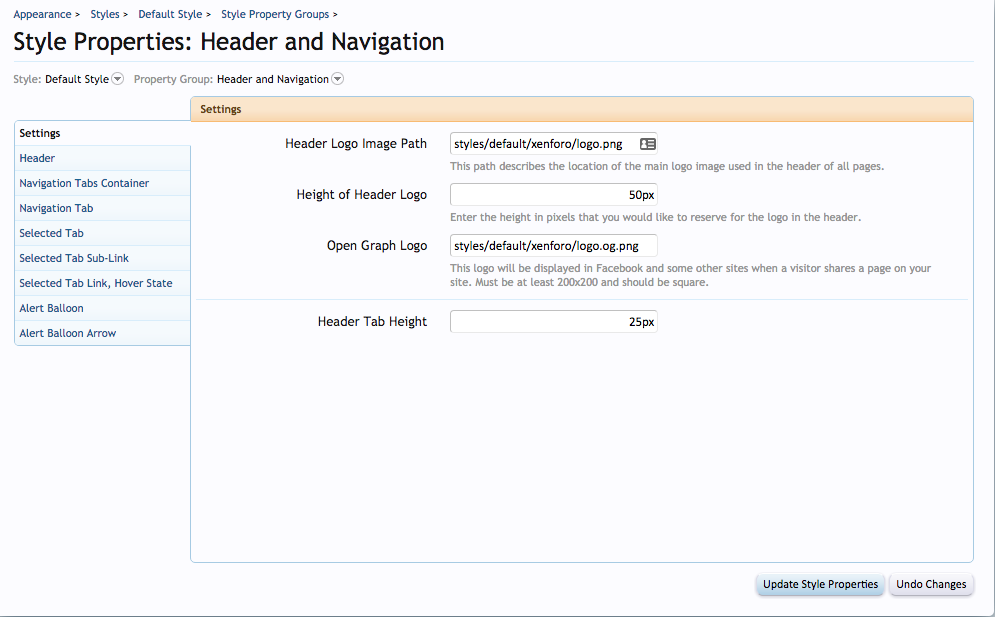
By default the XenForo logo will be used for both the forum itself and for the OpenGraph display.
Once you’ve got your own logos to use simply upload them to your server and update the settings in this panel to make the changes.
The OpenGraph image has to be at least 200 pixels by 200 pixels or it won’t display. I’m not 100% sure how strict the “square” rule is but the minimum dimensions is a requirement.





when i shared my resources content to social media it only show my forum logo, not my resource image!
is there any solution for that? when i shared normal thread(not resources) it just show image instead of showing my logo…theres different, can you suggest me any tutorial to fix this prob?
Nicky
It sounds like an issue with the templates.
I’d recommend checking the XenForo forums for assistance.
Michele